Filter Array
Filter Array keeps the items of an array that match a filter.
The filter works on the fields of each item, the same way Find Many Data Entries filters a datastore - but over an array the process already holds, without another lookup.
Use it to narrow a list you collected or received before a later step consumes it.
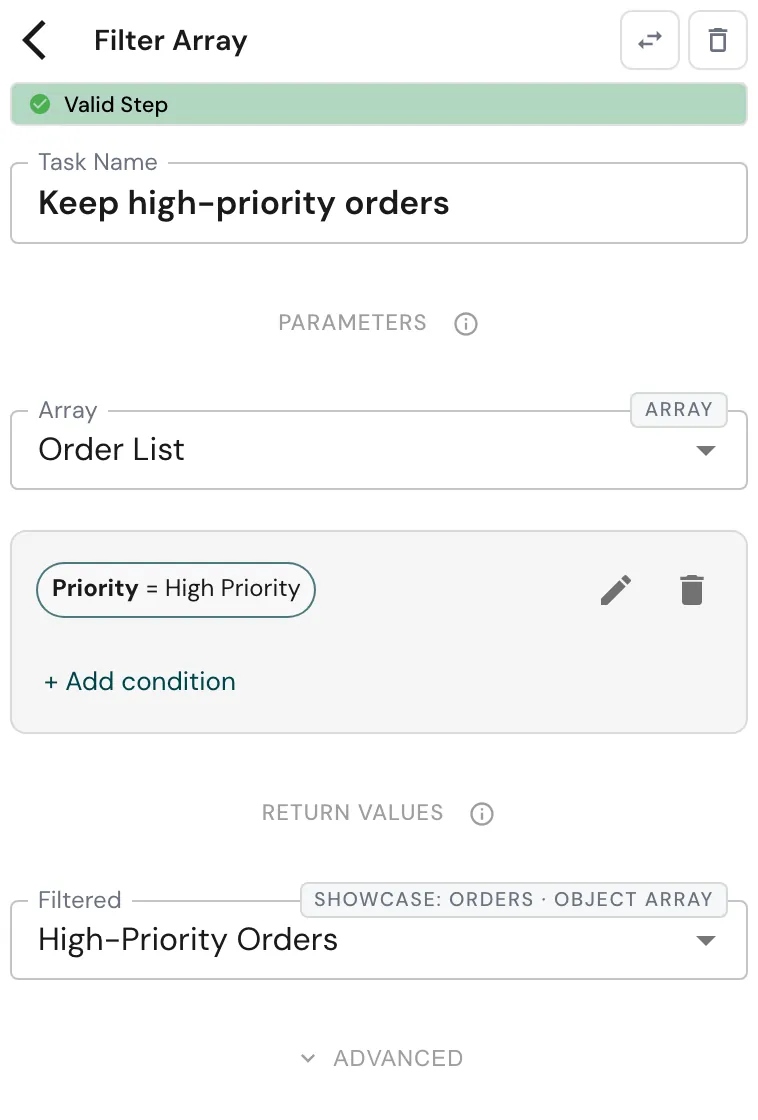
Configure this action in the Builder. See Builder Navigation and Workspace Basics for the surrounding UI.
Configuration
Set Array to the array symbol to filter. When its items are objects of a
known type, build the filter with + Add condition: its fields are the item’s
fields, so you compose rules like Priority = High Priority or
Amount > Threshold, and combine them into groups.
Under RETURN VALUES, map Filtered to the symbol that receives the result. It has the same type as the input array, so its items keep their fields for later steps. The step also exposes an Error Message.
Runtime behavior
Filter Array runs automatically.
It does not wait for user input.
- It keeps every item that matches the filter, in its original order.
- An empty filter keeps every item.
- If Array holds no array (for example it has no value yet), the result is an empty list.
Filter Array has no logical branch of its own - its normal outcome is success. Like any step, it can still be error-handled. See Error Handling.
Best practices
Give the array a typed item (an object type rather than a plain list), so the filter editor can offer the item’s fields.
Check whether the result is empty with Conditional Branching before a step that needs at least one item.
Use cases
- Narrowing collected data: keep only the high-priority orders after collecting order data in a loop - see the high-priority order report.
- Filtering on what a search can’t: keep instances by Status after reading them with Get Instance Data.
- Preparing an export: drop rows you don’t want before Create CSV.
Works well with
- Push to Array to build the array you filter.
- Loop over Array to act on each item that remains.
- Create CSV to export the filtered list.