Find Instances
Find Instances searches the running and finished instances of one process by the values of its data.
You pick the process, build a filter over its global symbols, and the step returns a list of instance references - the way Find Many Data Entries searches a datastore.
To read the data of a match, pass its reference to Get Instance Data.
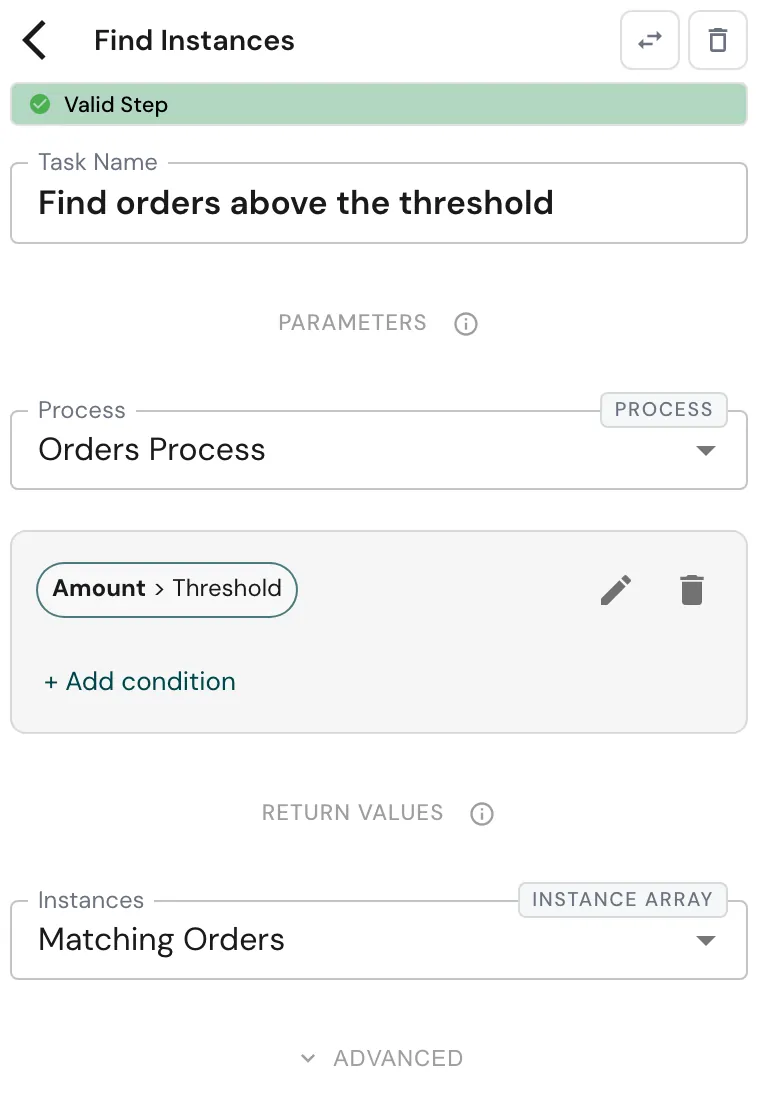
Configure this action in the Builder. See Builder Navigation and Workspace Basics for the surrounding UI.
Configuration
Set Process to the process whose instances you want to search.
Then build the filter with + Add condition. Its fields are the chosen
process’s global symbols, so you compose rules like Amount > Threshold or
Priority = High Priority, and combine them into groups.
The value you compare against comes from your own process’s data - a symbol of the process this step runs in, such as a threshold set at the start. Each value must be a single value (a text, a number, a date). The one exception is Included in, which takes a list of single values.
Under RETURN VALUES, Instances receives the list of matches. Its type is an array of instances of the chosen process, so later steps know which process each reference belongs to. The step also exposes an Error Message.
Runtime behavior
Find Instances runs automatically and returns references, not data.
- Matches come back most recently changed first, at most 500 of them.
- The instance running the step is never in its own results, even when it is an instance of the process it searches.
- If nothing matches, it returns an empty list - that is a success, not a failure. An empty filter matches every instance of the process.
- It searches every instance of that process in the workspace, not only the ones this process started.
The step fails with an error, before any search runs, when:
- the process doesn’t exist;
- a condition uses something other than a global symbol of the chosen process - a standard attribute such as status or name, a local symbol, or a value the platform keeps for itself;
- a compared value is not a single value (for example an object or a list outside Included in).
Connect an error path if the filter is built from values that might not fit.
Best practices
- Filter on stable business fields of the target process (an amount, a priority, a customer) rather than on values that change on every step.
- Branch on whether the result is empty with Conditional Branching rather than assuming matches exist.
- To select by a standard attribute such as Status, read the matches with Get Instance Data, collect them, and narrow the list with Filter Array.
- If you may need more than 500 matches, narrow the filter so the newest 500 are the ones you want.
Example: high-priority order report
The pattern spans three actions: find the instances, read each one, then keep the ones you need. A report process collects the high-priority orders from an orders process whose global symbols are Customer, Amount and Priority:
- Find Instances - Process is the orders process, the filter is
Amount > Threshold, where Threshold is a number in the report process. Instances goes to Matching Orders. - Loop over Array over Matching Orders, writing each item to Current Order.
- Get Instance Data on the loop path reads Current Order into Order Details, typed after the orders process.
- Push to Array adds Order Details to Order List, then returns to the loop.
- On the loop’s
successpath, Filter Array keeps the items of Order List wherePriority = High Priorityand writes them to High-Priority Orders.
Works well with
- Get Instance Data - read the data of each instance you found.
- Loop over Array - act on each match.
- Filter Array - narrow the collected data further, by any field.
- Processes - where the process you search is defined.