Webhook Subscriptions
Some providers only send events to a webhook that was registered through their API. Asana is one: there is no settings screen where you paste a URL, and the provider confirms each new webhook with a handshake before it delivers anything.
For connectors like these, metamorphOS registers the webhook for you. You pick an event on one of the connector’s accounts, say what to watch, and press Subscribe. metamorphOS registers its own webhook URL with the provider, completes the confirmation and keeps the signing secret the provider hands over. There is no URL to copy and no secret to set.
A connector offers this when it declares subscriptions. Its accounts then show a Subscriptions section; accounts of other connectors do not, and you register their webhooks at the provider as described in Inbound Webhooks.
Managing subscriptions needs permission to manage integrations. Admins have it.
Where subscriptions live
A subscription belongs to an account (a credential), not to the connector as a whole. The registration is made with that account’s access, so the provider only delivers what the account can see.
- Open Integrations and the connector.
- In the Credentials panel, each account lists its subscriptions in one line (Subscriptions: none until you add one).
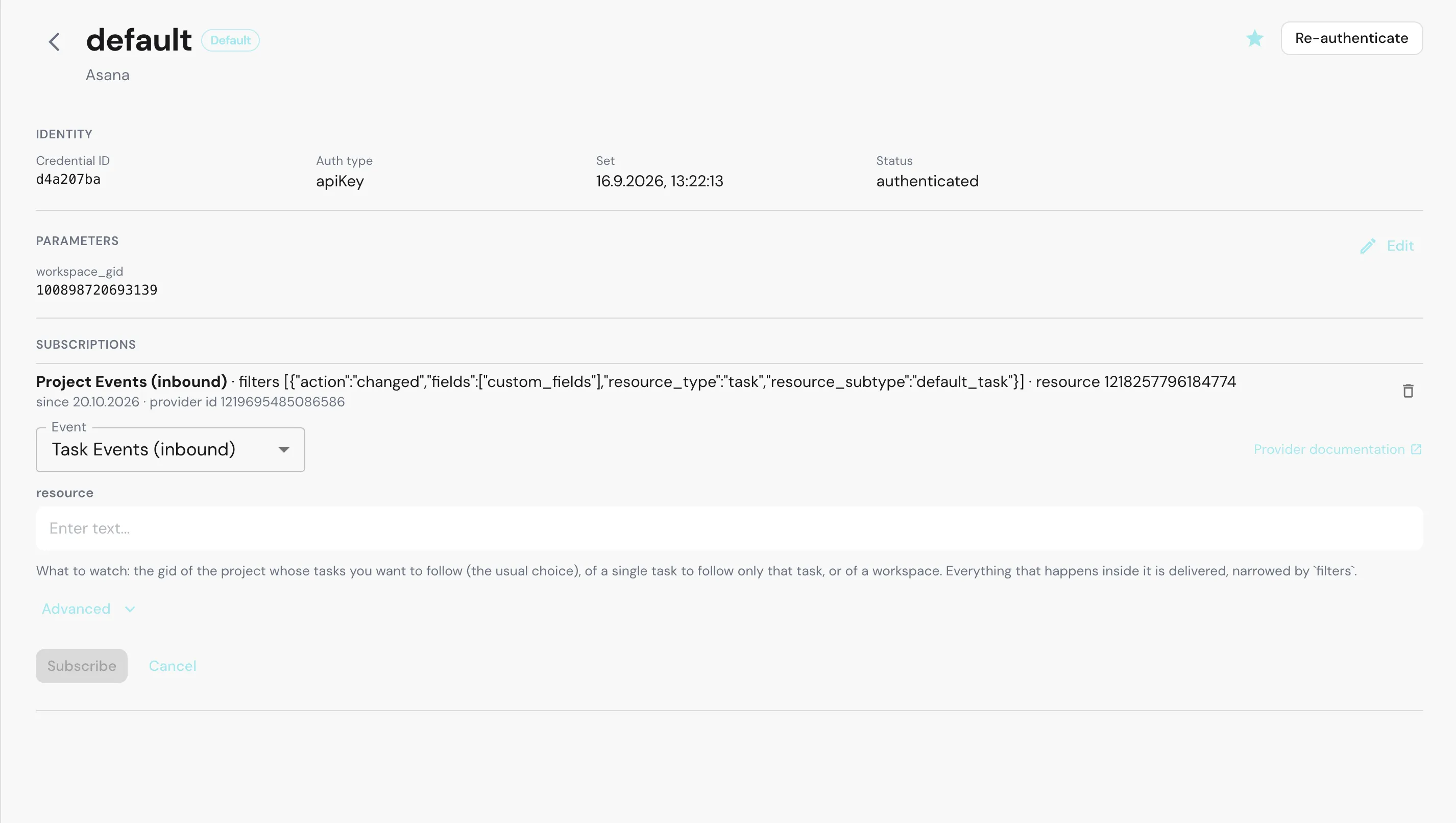
- Click Manage on the account. Its page shows Identity, Parameters and Subscriptions.
Subscribing
- On the account’s page, click Subscribe in the Subscriptions section.
- Choose the Event. The list holds the connector’s inbound events, the same ones you pick as an integration trigger in the Builder. A connector with a single event shows it without a list.
- Fill in the fields the event asks for. Each one carries a description of what it expects, and Provider documentation links to the connector’s guide.
- Open Advanced for the optional fields, usually the filters that narrow which events are delivered. Some events come with a filter already filled in.
- Click Subscribe.
Subscribe stays disabled until every required field has a value. Registering takes a moment: metamorphOS waits for the provider to confirm. If the provider refuses, the subscription is not created and the provider’s reason is shown under the section, so you can correct the field and try again.
A new subscription is listed with the event, the values you entered, since the date it was registered, and provider id, the identifier the provider gave the webhook. A row marked registering… is still waiting for that confirmation.
Connecting a process
A subscription only decides what the provider sends. Which process runs is decided in the Builder, as for any inbound webhook: add the same event as an Integration Trigger and deploy the process. See Starting a process from a webhook.
The order does not matter. A subscription made before the process is deployed is accepted: deliveries are acknowledged so the provider keeps the webhook alive, and processes start once one is deployed with that trigger. You also do not need to redeploy when you add a subscription, because the signing secret arrives with the subscription, not with the process.
To check the whole chain, change something the subscription watches and confirm a new instance of the process appears in Monitor.
Unsubscribing
Click the bin icon (Unsubscribe) on the subscription. metamorphOS removes the webhook at the provider, then forgets the subscription and its signing secret.
If the provider refuses the removal, the subscription stays and a Remove anyway button appears. Use it when the webhook is already gone on the provider’s side, for example because someone deleted it there or the provider disabled it after failed deliveries. Remove anyway forgets the subscription in metamorphOS without contacting the provider again.
Unsubscribe when you retire the process it feeds. A subscription keeps delivering until it is removed, whether or not a process still listens.
Example: Asana
The Asana connector offers four events: Task Events (inbound), Project Events (inbound), Comment Events (inbound) and All Events (inbound). Each asks for the resource to watch, usually a project, and optionally filters to narrow what arrives. The Asana page walks through it.
Related
- Inbound Webhooks - how deliveries are verified and routed.
- Authentication & Credentials - the accounts a subscription belongs to.
- Using Integrations in Processes - start a process from the event.
- Asana - a connector that subscribes this way.