Create Entry
Create Entry adds a single new record to a Datastore.
You fill the entry’s fields from the process, the step writes it, and it returns the new entry’s id so later steps can reference it.
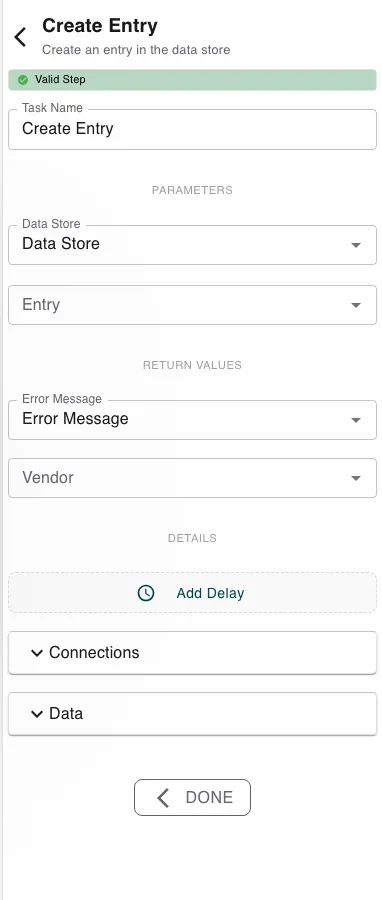
Configure this action in the Builder. See Builder Navigation and Workspace Basics for the surrounding UI.
Configuration
Pick the Data Store to write to. The step then shows one input per field of that datastore. Expand the entry to fill each field, mapping a value or a process symbol into it.
How the identifier is handled depends on the datastore:
- Auto ID on - the id field is hidden; the platform assigns the id.
- Auto ID off - supply the identifier field yourself.
Under RETURN VALUES the step exposes the new Entry ID and an Error Message you can read downstream.
Runtime behavior
Create Entry runs automatically and writes one entry.
- Fields that aren’t part of the datastore are ignored.
- With Auto ID, the assigned id is returned in Entry ID; without Auto ID, the id you supplied is used.
- The step fails if no datastore is set, the datastore doesn’t exist, or Auto ID is off and no identifier was supplied.
A missing required field does not block the write - the entry is created without it. If a field must be present, collect or validate it earlier in the process (for example with Conditional Branching).
Best practices
- Match each input to the field’s type so the stored data stays consistent.
- Creating several records at once? Use Create Many Entries instead of looping.
- Need create-or-update? Use Update Entry, which upserts.
Works well with
- Datastores - define the target datastore and its fields.
- Submit Information - collect the data to store.
- Get Entry - read the record back later by the returned id.