Get Many Entries
Get Many Entries reads several records from a Datastore at once, given a list of their identifiers.
Use it when you already hold a set of ids - for example the ids returned by an earlier step - and want all those records together.
Note
Configure this action in the Builder. See Builder Navigation and Workspace Basics for the surrounding UI.
Configuration
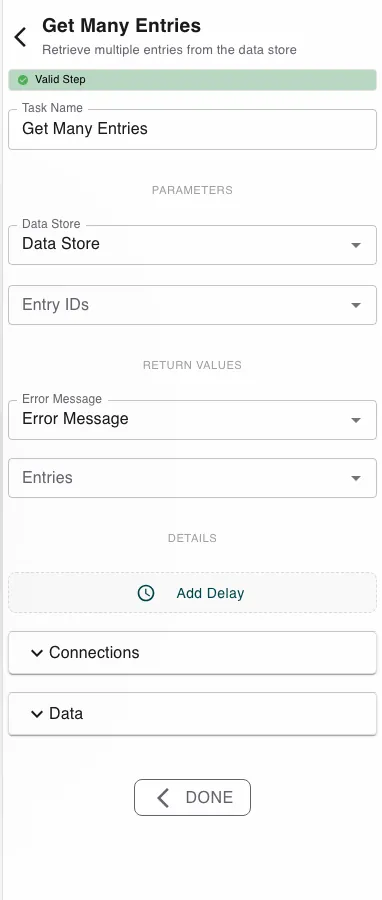
Pick the Data Store, then provide the Entry IDs - a list of identifiers, usually an array symbol carried from an earlier step. The step returns the matched Entries plus an Error Message.
Runtime behavior
Get Many Entries runs automatically and returns the entries whose ids match.
- Ids that don’t exist are simply left out of the result - missing ids are not an error. You get back the subset that exists.
- It fails only if no datastore is set or the datastore doesn’t exist.
Tip
Because missing ids are dropped silently, the returned list can be shorter than the ids you asked for. Compare the counts if every id must resolve.
Best practices
- Use Get Many when you have specific ids; use Find Many Data Entries when you’re querying by field values.
- For a single record, use Get Entry.
Works well with
- Find Many Data Entries - produce ids by a query, then fetch in bulk.
- Loop over Array - process each returned entry in turn.
- Datastores - the source datastore.
Last updated on