Info (Configuration Tab)
The Info tab is the process’s health check. It tells you whether the process is complete and correct, lists exactly what still needs fixing, and lets you jump straight to each problem.
A process cannot be deployed until it is valid, so this is the tab you work down to zero problems before publishing. The Valid or Invalid status at the top of the configurator reflects the same checks - clicking it brings you here.
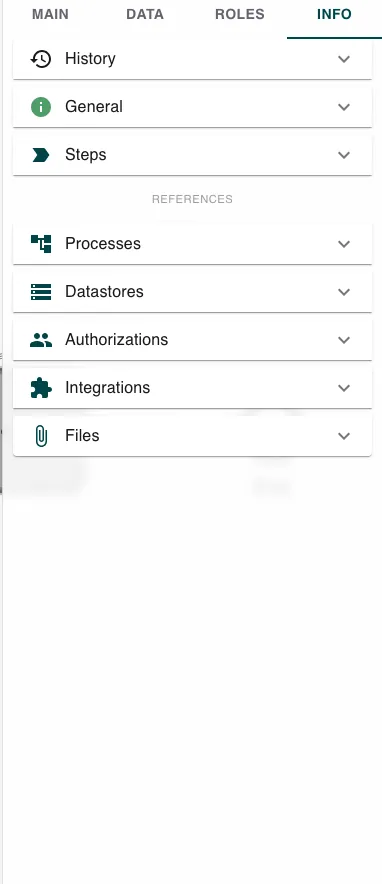
The Main, Data, Roles, and Info tabs configure the process as a whole. They are shown when no step is selected - click a step on the canvas and the panel switches to that step’s settings instead. See Builder Navigation.
What it checks
The tab groups its checks into sections you can expand:
- History - the process’s change history.
- General - process-level checks such as the name, permissions, a defined start point, and the instance naming template. When everything passes it simply reports that all general validations passed.
- Steps - the validation of each individual step. Invalid steps are listed with what is wrong, and clicking a step takes you straight to it on the canvas so you can fix it.
Below a References divider, further sections check everything the process relies on:
- Processes - the subprocesses it calls.
- Datastores - the data stores it reads and writes.
- Authorizations - the role assignments from the Roles tab.
- Integrations - the integrations and triggers it uses.
- Files - the files it references.
Each section turns red and shows a count when it has problems, so you can see at a glance where to look.
Working through problems
Expand the section flagged with a problem, read the issue, and fix it in the tab it belongs to - a step error on the canvas, a missing name on Main, an unassigned role on Roles. As each problem clears, the status moves toward Valid and Deploy becomes available.
Related
- Action Bar - the Valid/Invalid status and Deploy button.
- Roles (Configuration Tab) - where Authorizations problems are fixed.
- Data (Configuration Tab) - where data structures behind Datastore references are defined.