Inbound Webhooks
Webhooks let an external provider push events into metamorphOS - a new GitHub commit, a paid Shopify order, an updated HubSpot contact - instead of your processes polling for them. Each verified delivery can start or advance the processes subscribed to it.
A connector declares its inbound events as Webhooks (the editor’s second tab), next to its outbound API Calls. You give the provider a webhook URL, metamorphOS verifies each delivery is genuinely from that provider, and a genuine delivery triggers your process.
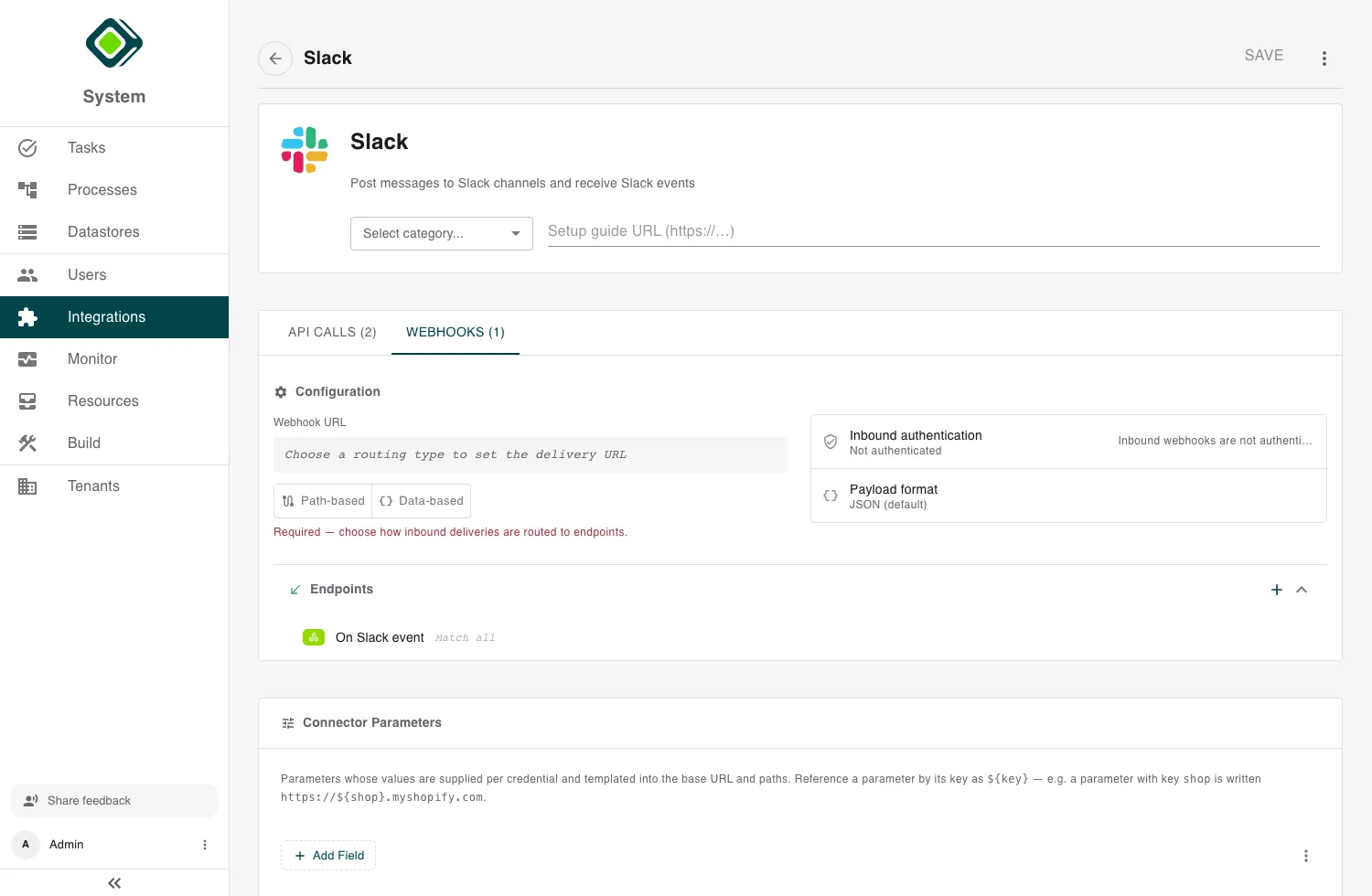
Providers don’t log in with a metamorphOS account. Instead, every delivery is verified by signature - a delivery that can’t be verified is rejected and never triggers anything.
Declaring a webhook
In the connector editor, open the Webhooks tab and add a webhook endpoint. First choose how deliveries are routed to your endpoints:
- Path-based - each webhook endpoint has its own URL. Give the provider that endpoint’s URL. Best when a provider posts different event types to different URLs.
- Data-based - every event arrives at one webhook URL, and metamorphOS decides which endpoint handles it by looking at the payload (see Matching conditions). Best when a provider sends every event to a single URL.
metamorphOS generates the Webhook URL for you. Copy it from the Webhooks tab (or the connector’s detail page) and paste it into the provider’s webhook settings.
Verifying deliveries
Open Inbound authentication and pick the method that matches how your provider signs its deliveries:
- HMAC signature - the provider signs the payload with a shared secret (GitHub, Shopify, Stripe style).
- Hashed digest - a plain hash of the secret and payload (some HubSpot versions).
- Shared token - the provider simply sends the secret in a header (Google channel-token style).
- Signed JWT (in body / in header) - the provider signs with a public/private key pair, verified against its public key or a JWKS endpoint.
Then match the details the provider documents: the header the signature
arrives in (for example X-Hub-Signature-256), any value prefix
(sha256=), and the algorithm and encoding.
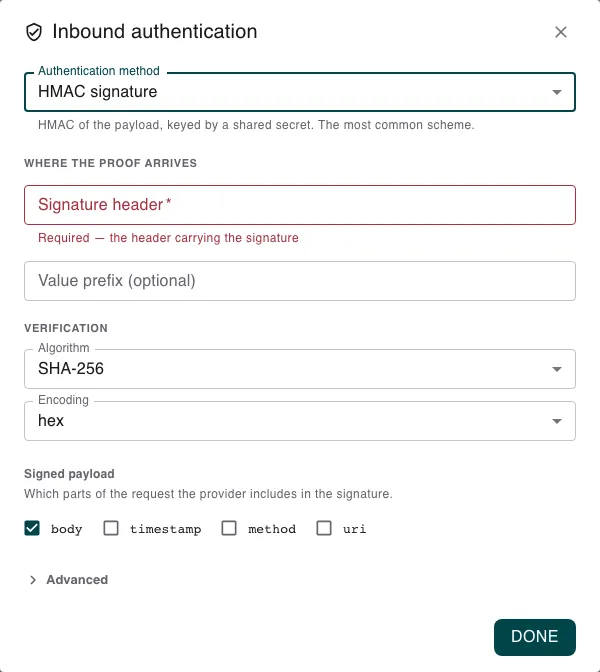
For replay-prone providers, open Advanced to enable replay protection - a timestamp header and a tolerance window. Deliveries whose timestamp is outside the window are rejected even if the signature checks out. Match the timestamp unit (seconds or milliseconds) to what the provider sends.
The signing secret
The signature method lives on the connector; the signing secret lives on an account. Generate a strong secret, give the same value to the provider (its “webhook secret” field) and to metamorphOS.
Set it from the Credentials panel: on the account, choose Set webhook signing secret (later, Rotate webhook signing secret). Like every secret, it’s stored once and never shown again. For a public-key provider, set the account’s webhook public key instead.
Set the secret before you deploy the process that subscribes to the webhook. The subscription captures the verification settings when the process is deployed - if the secret isn’t there yet, deliveries can’t be verified. Changed the secret? Redeploy the process.
Matching conditions
For data-based routing, each webhook endpoint defines matching conditions - rules over the incoming payload that decide whether this endpoint handles a delivery. Only deliveries whose payload matches are routed here. For example, route to an “order paid” endpoint only when:
event_typeequalsorder.paid
An endpoint with no conditions matches every delivery. If a provider wraps the real event inside an envelope, use the webhook’s payload format options to decode the body (for example JSON, JWT claims, or form-encoded) before the conditions are checked.
Triggering a process
A verified, matching delivery starts or advances the processes subscribed to that webhook function. To subscribe a process, add the connector’s webhook as a trigger in the Builder - see Using Integrations in Processes. Each delivery acts as the account’s identity, so choose the account (and its service user) deliberately - it determines what the triggered process is allowed to do.
The quickest end-to-end check: trigger a real event at the provider and confirm a new instance of the subscribed process appears in Monitor.
Rotating the secret
Rotate a signing secret from the account’s menu. The new value works immediately; for a short window the old value may still verify while caches expire. For a zero-gap rotation, set the new secret on a second account of the connector first - a delivery is accepted if it matches any of the connector’s active signing secrets - then remove the old one.
Related
- Building Custom Connectors - the editor where you add webhook endpoints.
- Authentication & Credentials - accounts hold the signing secret and the identity deliveries act as.
- Using Integrations in Processes - subscribe a process to a webhook.
- Troubleshooting - when deliveries are rejected.